
Download 3Drop – 3D Model Collection, 3D Printing, iPhone App, 3D Model Viewer
Overview
3Drop - 3D Model Collection is a multimedia application tailored for iPhone users seeking an efficient and integrated platform to explore, organize, and manage 3D models. Developed by WU FU-HUNG, the app consolidates content from leading 3D printing communities such as Thingiverse, Printables, Makerworld, and Cults 3D, offering a unified interface for accessing a diverse range of digital designs. Designed for hobbyists, educators, and professionals involved in 3D printing, 3Drop simplifies the discovery and curation of models by eliminating the need to navigate multiple websites separately.
The application addresses the common challenge of fragmented access to 3D model repositories by providing synchronized favorites across platforms. Users can log in once and maintain consistent access to their preferred models, follow standout creators, and build personalized collections. This feature enhances workflow continuity and reduces time spent switching between services. Real-world use cases include classroom projects requiring accessible 3D assets, DIY enthusiasts sourcing printable parts, and designers curating inspiration libraries. The app’s search functionality enables users to browse trending and newly uploaded models, supporting ongoing creative development.
Key Features & Capabilities
- Unified Platform Access – Aggregates 3D models from multiple popular websites, enabling users to access content from Thingiverse, Printables, Makerworld, and Cults 3D through a single interface.
- Synchronized Favorites – Allows users to save and manage favorite models across all integrated platforms using a single login, ensuring consistent access regardless of the source.
- Author Following System – Enables users to follow talented creators across platforms, receiving updates on new uploads and innovations.
- Advanced Search Functionality – Offers robust search tools to explore popular, trending, and recently uploaded 3D models, supporting discovery and inspiration.
- Personalized Model Lists – Lets users create custom collections for projects, categories, or themes, improving organization and retrieval efficiency.
These features collectively streamline the 3D printing workflow by reducing platform fragmentation. For example, a teacher can follow a specific maker, save relevant models for a lesson, and search for new educational designs without leaving the app. Similarly, a hobbyist can build a collection of mechanical parts for a project, ensuring all necessary files are centralized. The integration of cross-platform favorites enhances user retention and engagement, making 3Drop a valuable tool for anyone deeply involved in 3D printing ecosystems.
User Interface, Workflow & Performance
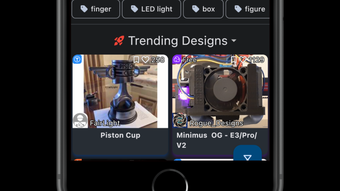
The user interface of 3Drop is designed with iPhone usability in mind, leveraging iOS-native navigation patterns for intuitive access. The layout emphasizes clean organization, with dedicated sections for trending models, personalized lists, and followed authors. Navigation is likely structured through a bottom tab bar, allowing quick switching between core functions such as Home, Search, Favorites, and Profile.
Workflow efficiency is enhanced by the app’s centralized model management. Users can view model details, preview thumbnails, and initiate downloads or exports directly within the interface. The integration of synchronized favorites reduces redundant actions, such as manually saving the same model across multiple sites.
While specific performance data was not provided, the app is expected to operate smoothly on supported iOS devices, leveraging native rendering for 3D model previews. The developer did not specify resource usage details, so CPU and RAM behavior remain unknown. Stability is likely maintained through regular updates, though no information on crash rates or background performance was shared.
Compatibility & System Requirements
3Drop - 3D Model Collection is designed for iPhone users and is compatible with iOS devices. The application is available for download on the App Store, though specific iOS version requirements were not listed. Installation size is not specified, and no hardware requirements beyond standard iPhone capabilities were mentioned. The developer did not provide additional system requirements, so compatibility with older or newer devices remains unclear.
Platform compatibility information is limited, and users should consult the App Store listing for the most accurate details. The app’s functionality appears optimized for mobile use, with a focus on touch-based interactions and responsive design. No information was provided regarding support for iPad or other Apple devices. For users seeking a desktop alternative, no such option was indicated in the available data.
Pros and Cons
Pros
- Centralized access to multiple 3D model platforms
- Synchronized favorites across integrated websites
- Efficient search and discovery of trending models
- Support for following creators and managing personalized lists
- Designed for iPhone with native iOS interface
Cons
- Availability limited to iPhone only
- No information on system requirements or device compatibility
- Performance and resource usage details not disclosed
- Limited to iOS ecosystem; no desktop or tablet support
- App-specific update frequency not provided
FAQ Section
Is 3Drop available for Windows or Mac?
Based on the available information, 3Drop is designed exclusively for iPhone users and is not available for Windows or Mac operating systems.
Can I use 3Drop without an internet connection?
While the app may allow offline viewing of previously downloaded models, the primary functionality—such as searching, syncing favorites, and accessing new content—requires an active internet connection.
Is the app free to download?
The pricing information for 3Drop was not specified. Users should check the App Store for current pricing and any in-app purchase options.
How often does 3Drop receive updates?
Specific update frequency details were not provided. Updates are likely released periodically to maintain compatibility and add new features.
Is my data secure when using 3Drop?
The developer did not provide information on data security practices. Users are advised to review the app’s privacy policy and permissions before use.
Final Thoughts + CTA
3Drop - 3D Model Collection stands out as a streamlined solution for iPhone users navigating the expansive world of 3D printing resources. By unifying access to multiple platforms and offering synchronized favorites, it significantly reduces the friction associated with managing 3D models across different websites. Its intuitive interface and focus on user-centric features like author following and personalized lists make it a practical tool for educators, hobbyists, and professionals alike.
While the app’s exclusive iOS availability and lack of detailed system information may limit its reach, its core functionality is well-aligned with the needs of mobile-first 3D printing enthusiasts. For users already invested in the iPhone ecosystem and reliant on platforms like Thingiverse or Cults 3D, 3Drop offers a convenient and cohesive experience.
Download 3Drop now and elevate your 3D printing workflow with seamless access to the world’s most popular model repositories.







